.png)
Catching Up on Past Income (Jump Start Catch-Up)
If you start a Jump Start entry for a W-2 source that already has entries logged this year, Flux automatically switches you into a Catch-Up flow instead of the regular Jump Start form. This keeps you from double-counting income you've already logged.
- Start a Jump Start entry (from Add Entry → "Catching up on past income?", or from a source's three-dot menu → Log Jump Start) and select the W-2 source.
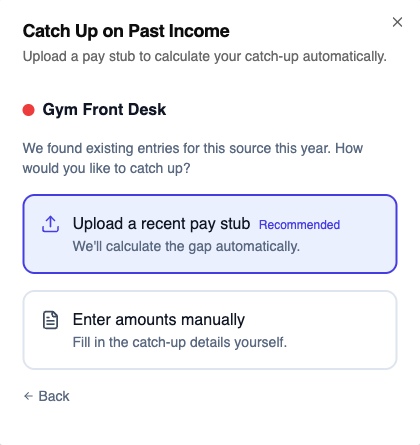
- If Flux finds existing entries for that source this year, you'll land on the Catch Up on Past Income screen. Choose how to fill it in:
- Upload a recent pay stub (recommended) — Flux reads the year-to-date numbers off the stub and calculates the gap between what's on the stub and what you've already logged, automatically.
- Enter amounts manually — takes you to the regular Jump Start form instead.
- If you upload a stub, Flux shows a table comparing Already logged vs. Gap to add for gross income and each tax withholding field (state paid leave and city tax only show if there's actually a gap). Only the gap gets added — not the full YTD amount — so your totals stay accurate.
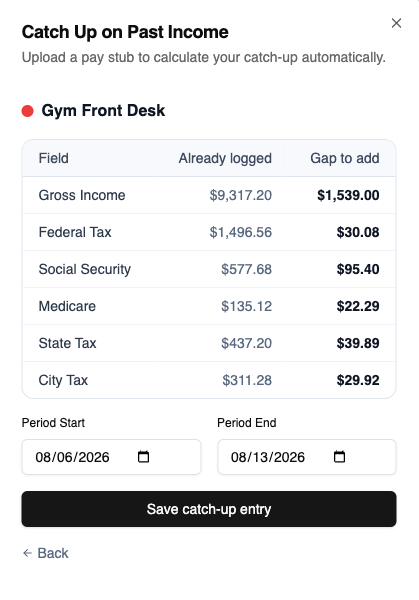
- Confirm the catch-up period (Flux pre-fills the start date as the day after your last Jump Start entry, or January 1st if you don't have one, and the end date as today), then click Save catch-up entry.
If your uploaded stub's year-to-date gross is already less than or equal to what you've logged, Flux tells you that you're already caught up on this source and lets you enter manually anyway or try a different stub.

Note: catch-up only applies to W-2/Employee sources. For 1099/self-employed sources, Jump Start always goes straight to the regular form.