.png)
How to Log Income (Work, Paycheck, Bonus, Tips, or Commission)
Click Add Entry (available from your Dashboard or Sources page) to record income you've earned.
-
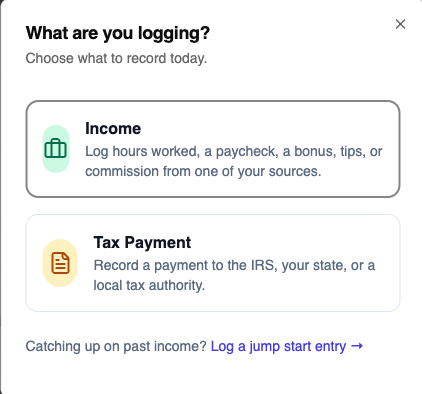
Choose what you're logging. You'll see two main options: Income (hours worked, a paycheck, a bonus, tips, or commission from one of your sources) and Tax Payment. Below those is a smaller link — "Catching up on past income? Log a jump start entry" — for adding income you earned before you started tracking it in Flux, or for catching up a source you've fallen behind on. Choose Income.— the "What are you logging?" screen showing the Income and Tax Payment options, plus the "Catching up on past income? Log a jump start entry" link underneath.
-
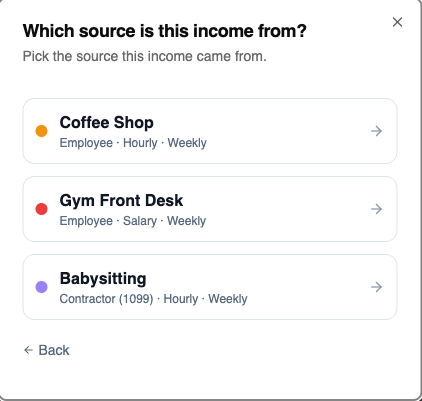
Pick the source this income is from, from your list of active sources — the source picker screen.
- If that source has auto-log turned on, Flux lets you know it's already logging this source automatically and gives you two options: log something manually anyway (for anything auto-log wouldn't catch, like a bonus), or go review and edit recent auto-logged entries. If auto-log isn't on, you'll skip straight to the next step.
-
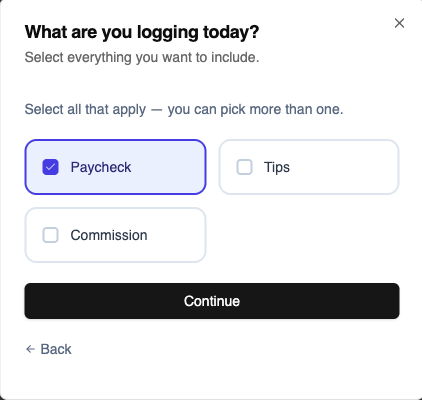
Select everything that applies to this entry — only the categories that source has enabled will show up (Regular Hours/Paycheck/Payment, Overtime, Tips, Bonus, Commission), and you can select more than one at once. — the category picker with a few chips selected.
- If you included Regular Hours/Paycheck/Payment, choose how to enter it: upload a pay stub (Flux auto-fills the pay period, hours, gross pay, and taxes) or enter it manually. Any other categories you picked (tips, bonus, commission, overtime) skip this and go straight to their own fields.
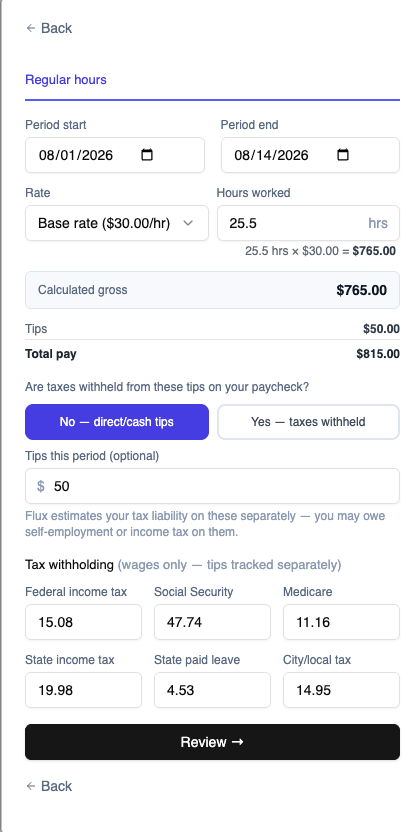
- Fill in the details for everything you selected — the filled-in entry form (any income type is fine to capture)
-
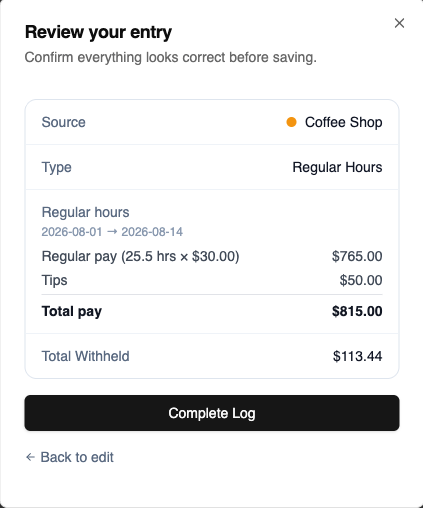
Review the summary Flux builds from what you entered, then click Complete Log to save— the review screen showing the summary before saving.
Once saved, the entry shows up in your Dashboard activity feed and counts toward your Time Off Bank and Reports immediately.
Note: the source picker in step 2 now shows every active source, including salary sources — if you're logging a Jump Start entry and pick a W-2 source that already has entries for this year, Flux automatically switches you into the Jump Start Catch-Up flow instead of the regular form. See the Catching up on Past Income article.