.png)
How the Time Off Bank Works
Your Time Off Bank tracks the gap between your income goal and what you've actually earned, converted into days.
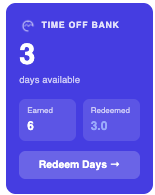
Every time you log income, Flux compares your total earned income for the period to your goal. If you're over goal, the surplus is converted into days off using your value per day — the dollar amount you've decided one day off is "worth" to you. Those days accumulate in your Time Off Bank and stay there until you use them.
If you're under goal, no days are subtracted — your bank simply doesn't grow until you catch up. It's a running total, not a penalty system.
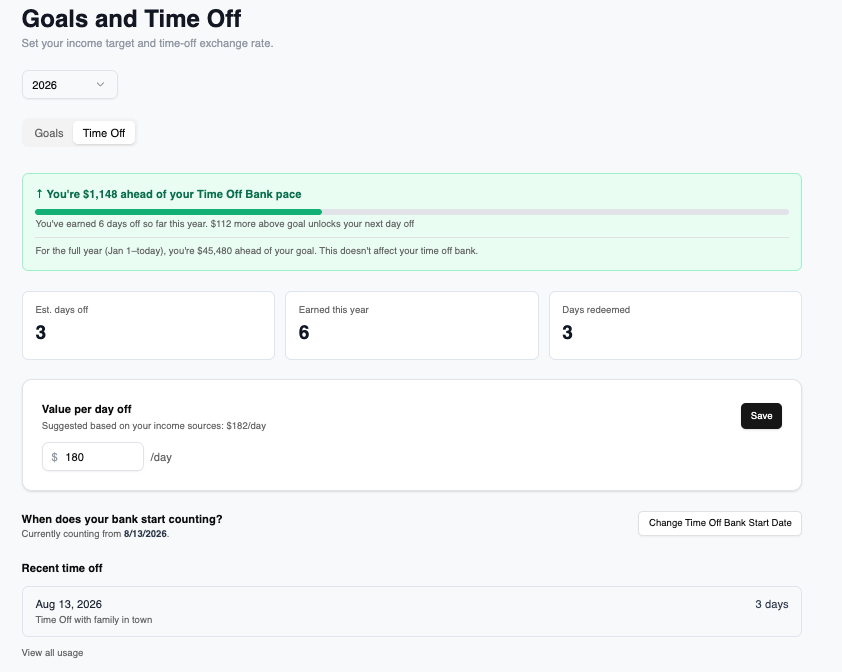
Under Profile → Goals and Time Off (paid plans), you'll find your full Time Off Bank breakdown:
- A pace card telling you whether you're ahead or behind your Time Off Bank pace in dollars, with a progress bar toward your next day off and how much more you need to earn to unlock it.
- Three stat tiles: Est. days off (your current banked total), Earned this year, and Days redeemed (days you've already used — see [[Redeeming Your Banked Days Off]]).
- Your value-per-day setting, with a suggested amount based on your income sources if you haven't set one.